Power Automate will let you put a GPT prompt inside a live business process in about a minute. Add a step, write some English in a box, wire the output onward. I have demoed that minute more times than I can count, because it is genuinely the best thing the platform does: the people closest to a process finally get to automate it, without a project code and without a steering committee.
I follow the demo with a warning, because the same minute is the entire risk, and the incident it produces is predictable enough to narrate before it happens.
An output looks slightly off. The flow’s owner opens the prompt, adjusts one sentence the way anyone adjusts an email that is not landing, and saves. The output improves. Everyone goes home pleased.
What nobody in that scene can see is that the sentence which fixed one document has bent the reading of a hundred others. Not into garbage, which gets caught the same day, but into slightly wrong, in a consistent direction, in a field nobody eyeballs. Weeks later someone asks the only question a post-mortem ever asks: what changed, and when?
Nothing recorded it. No version, no diff, no note. The edit lives in one person’s memory, already going soft at the edges. The team is now debugging a deployment that officially never happened.
Dressed as configuration
A prompt is code that arrives dressed as configuration.
Look at what that box actually holds. The words in it decide what gets extracted, how edge cases are read, what the system believes a document means. That is behaviour, and everywhere else in the stack, behaviour is code. Code earned its ceremony through fifty years of exactly the incident above: version control, review, a test before shipping, a record of what changed. Nobody would be allowed to rewrite a stored procedure in production because an output looked a bit off. The suggestion alone would trigger an intervention.
But a prompt does not look like a stored procedure. It looks like a paragraph. It is written in English, it lives in a friendly box, and editing it feels like editing an email, an act we all perform forty times a day without ritual. The costume is convincing enough that careful people, people who would never touch code casually, will touch a prompt casually.
We have run this experiment before. The spreadsheet that quietly became the pricing engine. The Access database holding a department together. The macro nobody dares reopen. Power moves faster than discipline, works brilliantly, and one day the invisible system fails and there turns out to be no history anywhere. Prompts are the newest costume, with one upgrade on their ancestors: this time the hidden logic can be wrong in fluent, confident English.
The citizen developer is not the danger. The costume is.
A folder called prompts
So here is what I actually do, and none of it is clever.
The prompt does not live in the flow. It lives in a file, in the project repository, next to everything else that decides what the system does.
prompts/order-extract/
  prompt.md        the text that goes in the box
  schema.json      the shape the output has to take
  cases/           41 real documents, ugliest first
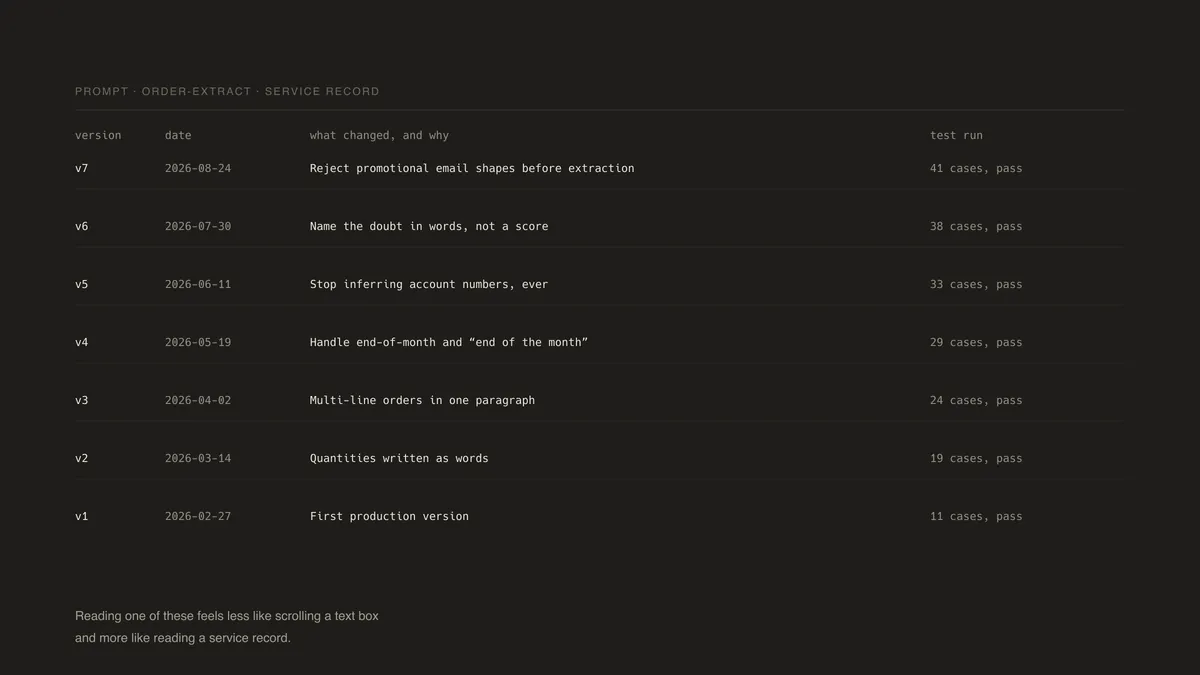
  CHANGELOG.md     one line per version: what changed, why, test run
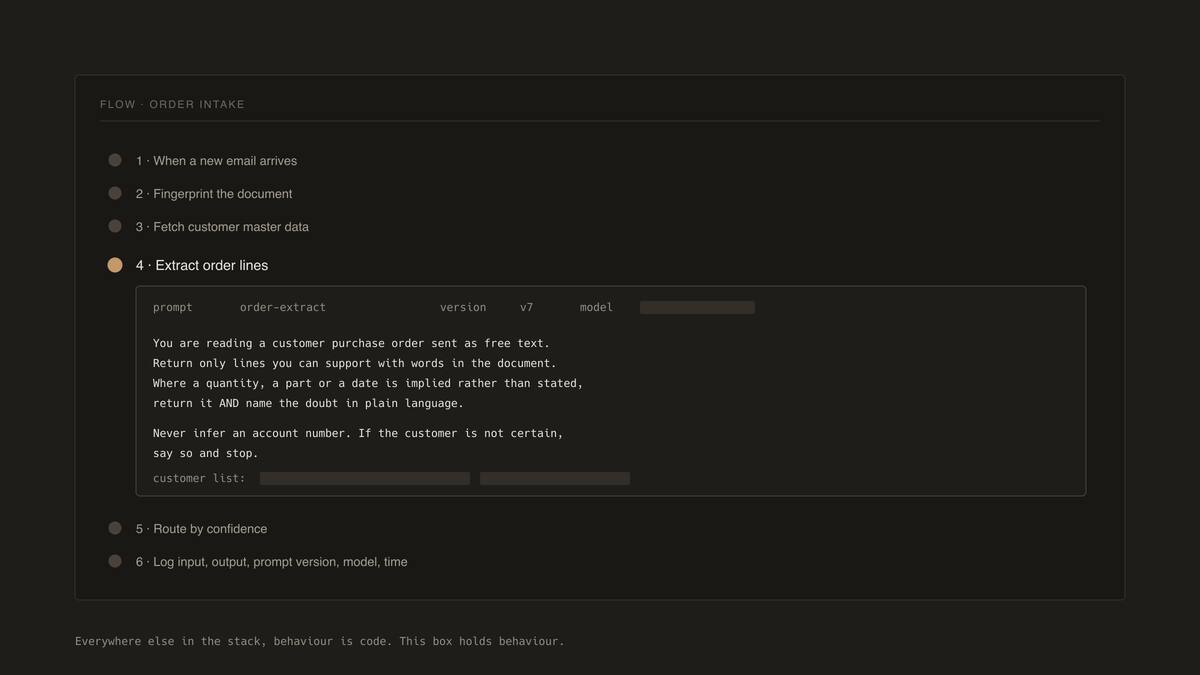
The copy sitting in Power Automate is a deployment artifact, the way a compiled binary is. It is the thing that runs. It is not the source. A change happens in the file, the commit message carries the why, and the version string is part of what gets pasted into the box. The flow logs input, output, prompt version, model and time on every run, so any log line from any month points at a commit that explains itself. The post-mortem stops being archaeology and becomes a two-minute lookup.
Half the value of version control was never the old versions. It is that change becomes an event, something that visibly happens, rather than something the system silently absorbs.
Log the model as well, and pin it if the platform will let you. A provider upgrading a model underneath you is a deployment you did not make and cannot see, and it will move your outputs on a morning when nobody on your team touched anything. If you cannot pin it, record it, so that the day the behaviour shifts you can tell your change from theirs.
The form manufactures the lie
Between systems, the model does not return a paragraph. It fills a defined structure, every field named and typed, validated before anything downstream moves.
{
  "account_match": "string or UNKNOWN",
  "lines": [ { "product": "string", "quantity": "number" } ],
  "requested_date": "date or UNKNOWN",
  "confidence": "high | medium | low"
}
When validation fails, send the failure back to the model with the error attached. A model shown its exact mistake usually fixes it on the second pass. It is a strange component that responds to a bug report, so file one.
The word UNKNOWN is doing more work in that schema than any sentence in the prompt. Every contract needs an exit, an honest way for the model to say it does not know, and building one kills more hallucination than any clever instruction you can write. The reason is almost funny. A model asked to fill every field will fill every field. It has no mechanism for leaving a box empty and no way to tell you it would rather not. If the form refuses to accept silence, the form is manufacturing the lie.
So build the exit, then treat the model taking it as a success. An UNKNOWN routed to a human is the system working. It never feels that way in a demo, which is most of why demos do not have one.
Make it name its doubt in words rather than score it. A confidence of 0.72 tells a human nothing they can act on. “The quantity is written as a word and could be eight or eighty” tells them exactly what to look at, and takes the same half second to read.
Take the examples inside the prompt from production rather than imagination. Tidy sample documents teach the model less than you would hope, because real customers are not tidy. The examples that move accuracy are the ugly ones: the scanned fax, the order written as prose, the spreadsheet with merged cells, scrubbed of names and kept in all their deformity.
Then keep them. Everything that goes strange in production becomes a file in that cases folder, and the folder becomes the gate. Before a prompt change ships, the new version runs against every past weirdness in it. The four o’clock edit fails against three old documents before it ever meets a live one, and the afternoon stays boring, which is the whole ambition of this kind of engineering.
One last piece of scope, because the excitement makes people forget it. Perhaps a fifth of the steps in my flows involve a model at all. The rest are dates, lookups and arithmetic, which the platform does deterministically, instantly and for nothing, and which a one-line expression will always do better than a paragraph of English. Spend the model where the mess is genuine.
None of this was ever really about artificial intelligence. A brilliant, tireless, occasionally wrong new colleague has joined every team that clicks the prompt step, and the teams that thrive are the ones that noticed a colleague arrived. Give it a job description you can read back. Give it a way to say it does not know. Keep the record of what you asked for and when you changed your mind.
Stop configuring the AI. Start onboarding it.