For years, plain text files had the reputation of being a bit austere. Useful, yes, but mostly for programmers, obsessives, and other harmless weirdos who enjoy tools that look unfinished.
Then AI arrived, and plain text started to look different.
Because, in practice, plain text is one of the easiest formats for both humans and AI to work with.
A few months ago, I found myself asking Codex about a project I had completed years earlier: my workout app. It is not a polished commercial product. It is a system I built for myself. One part generates workout logs. I take those logs to the gym. The results go into a database. The planner reads that history and uses it to keep progression moving in roughly the right direction.
What I wanted was not just a recap of the project. I wanted help thinking about whether I should revisit it.
Because my notes, project plans, and task lists live in plain text, (I’ve used vim for nearly 20 years, now neovim), Codex could pull together the project plan, related notes, and the completed tasks connected to that work. It could surface the shape of the project quickly enough to be useful, rather than forcing me to reconstruct it from memory. More importantly, it could connect that old project to my current commitments and tell me something a bare project archive would not: given everything else I had going on, this probably belonged in a later quarter, not this one.
That was the moment the value stopped being theoretical.
The interesting thing was not that AI could “read my files.” Plenty of software can read files. The useful thing was that it could read across several kinds of files, understand the relationship between them, and help me make better use of information I already had.
That works unusually well when the underlying material is plain text.
Plain text keeps information usable
For a long time, I stayed with plain text for older reasons. I liked open tools. I did not want my notes trapped in a format that only one application handled properly. I also liked being able to script against my own data.
That mattered in practical ways. I could write scripts to store and surface possible writing ideas using BASH and DMenu. I could connect projects to tasks. I could generate views of my own information that were more useful than whatever a single app designer thought I should have.
The point was never minimalism for its own sake. It was optionality.
That still feels like the right word for it now.
Using plain text keeps your information easy to reuse, whether you want to script it yourself or hand it to AI.
That does not mean plain text is magically better than every other format. It means your information stays in a form that is easy to search, copy, paste, transform, compare, and move between tools. In the AI era, that matters more than it used to.
What changed when AI arrived
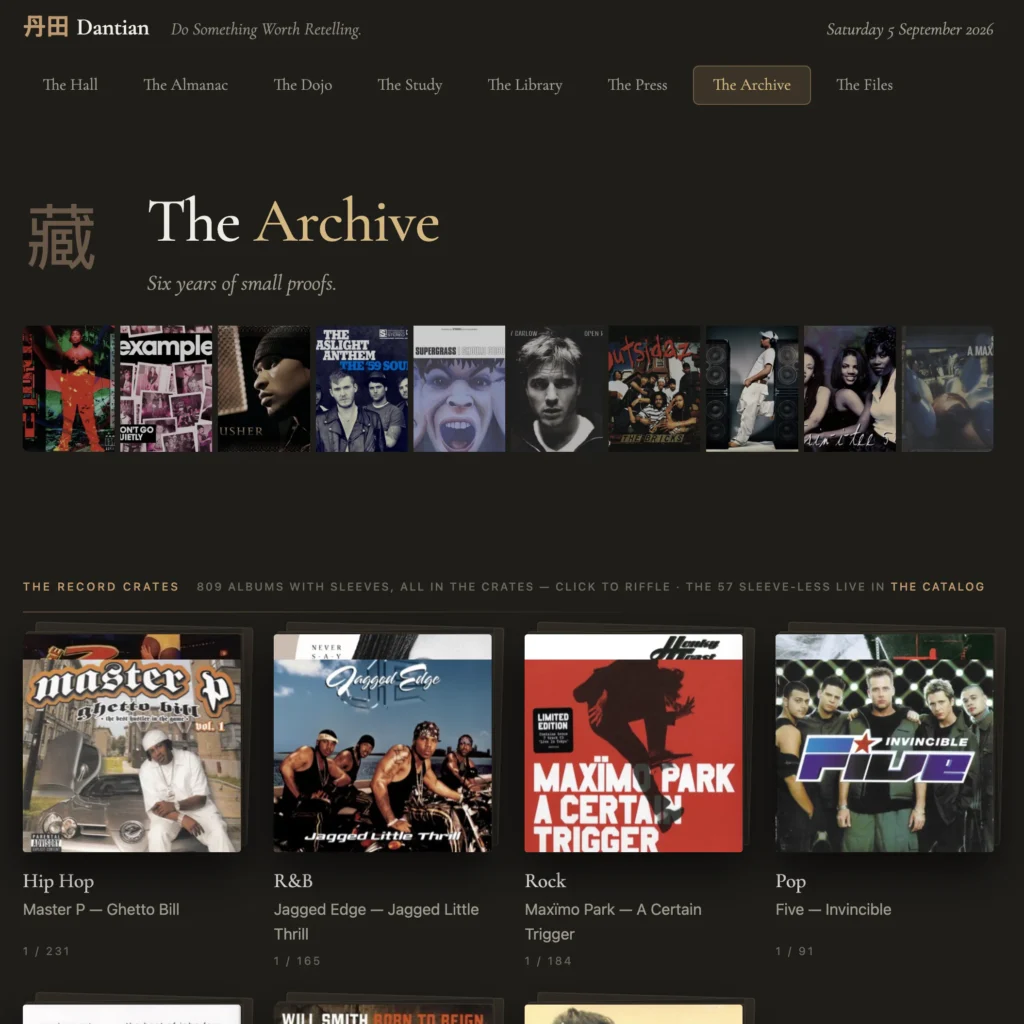
My CD Collection archive page in my life hub, pulled from a sqlite database of my CD collection built by a python script that pulls metadata (like album art) from public services like MusicBrainz.
Before AI, plain text made my systems programmable.
Now it makes them programmable by a much larger class of tools, including tools that can exercise a bit of judgment.
A good example is my own “life hub,” which is the page I use as my browser home page and new-tab page. It pulls in information from databases, task files, notes, and other sources. If it only displayed static information, it would be dull and mostly ignorable. Instead, scripts and AI help it produce a changing summary of what is on my mind, what needs attention, and what looks important right now.
Another example is capture. I can record voice notes, transcribe them, and let AI help separate what belongs in notes from what might be a task or something that needs processing later. Because the material ends up as plain text, it can be read and written back into the rest of my system rather than sitting in an isolated app as a dead-end transcript.
The same thing applies to project plans. I used to use a Python script doing a two-way sync between my task list and project plans. It worked, in the sense that many homemade systems work: until they didn’t. Duplicates appeared. Things went missing. The logic was brittle. Now I can let Codex read my task file and project plans directly, notice relevant next actions, and add them where they belong. The result is not mystical. It is simply less fragile.
That is a broader shift worth noticing.
What used to require a careful script for one narrow job can now often be done by an AI that reads across notes, tasks, context files, and plans. But that only works well when the information is accessible in the first place.
Why this matters even if you are not a “plain text person”
This is where the article could easily become annoying, so let me be clear: I am not arguing that everyone should move their life into Markdown or Obsidian.
I am saying this is now a more useful option than many people realise.
A lot of mainstream tech users already work with AI every week. They use ChatGPT. They use Copilot. They paste things into prompts. They ask for summaries, plans, rewrites, comparisons. But many of them still keep important information inside tools that are awkward to extract from, awkward to recombine, or simply not designed to be handed around.
By contrast, a plain text file can be attached, pasted, searched, versioned, split up, or reused almost anywhere.
That sounds banal until you try it.
I keep several context files for AI conversations. One is a basic biography: background, education, major life changes, broad personal context. Another covers areas of focus and responsibility: work, family, hobbies, long-term goals, ongoing commitments. Another covers my professional role and the kinds of projects I work on, without including anything sensitive.
The benefit is not that the AI suddenly “knows me.” The benefit is that it stops hallucinating a simpler life than the one I actually have.
Without that context, if I ask for a 12-week workout plan, I tend to get a generic answer: a respectable but bland strength-and-hypertrophy programme, as if my life consists entirely of wanting bigger numbers. With more context, the answer changes. The AI sees that I also run and train martial arts, and the plan becomes more realistic. It accounts for fatigue, recovery, and competing demands.
That is a small example, but a useful one. More context beats better prompts every time. Plain text makes context inputs easy to maintain and easy to supply.
A simple version of this, which almost anyone could try tomorrow, is to create a single Markdown or text file with stable context about who you are, what you do, what responsibilities you have, and what kinds of help you usually want. Then use that file when starting a new AI conversation.
You do not need to build your own software. You do not need to become a terminal goblin. You just need to keep some important information in a form that remains easy to reuse.
The workplace angle is stranger than people expect
This also matters at work, and not only for hobbyist systems.
Recently I was building an AI-assisted workflow in Microsoft’s world: an agent in Power Automate that reads purchase orders from email and creates sales orders in Dynamics 365. You might assume this would be smoothest when customers send documents in Excel, because the whole workflow already lives inside Microsoft tools.
In practice, it was not.
PDFs were easier to work with if they had a usable text layer. Excel files, even simple ones, were much less straightforward to hand to the prompt and get good extraction from. That is not because Excel is a “bad” format. It is because an .xlsx file is not just plain tabular text. Microsoft describes Office formats such as .docx and .xlsx as XML-based Open XML formats, essentially structured packages with multiple parts, rather than simple text documents. (Microsoft Support)
That distinction matters.
A Word or Excel file may be machine-readable in theory, but still awkward for a general-purpose AI workflow in practice. A plain text or Markdown file gives the model one obvious thing to consume. Rich office formats carry much more structure, formatting, and packaging baggage around the content.
This is not an argument against Word or Excel. They are good at many things plain text is bad at. It is simply a reminder that the format you store information in affects what can be done with it later.
Plain text is becoming a control layer for AI
There is also a nice irony here.
For years, plain text looked old-fashioned. In the AI era, it keeps turning up as the natural control layer.
OpenAI’s Codex uses AGENTS.md files to give the agent reusable instructions and context before it starts work, and Anthropic’s Claude Code uses CLAUDE.md files for a closely related purpose. Both are plain-text Markdown files that act as persistent guidance.
That does not prove that plain text will win every format battle, or that every AI tool will standardise around one file convention. It does suggest something more modest and more interesting: when people want to give AI durable instructions, they keep reaching for simple text files.
That is not nostalgia. It is convenience.
The tradeoffs are real
Plain text also has obvious disadvantages.
The reading experience is often worse. Markdown viewers are not as common or as polished as mainstream office apps. On a phone, it is perfectly workable, but not luxurious. Rich formatting, layout, and visual presentation are simply better in other tools.
There is also the question of boundaries. I keep sensitive information out of the files I plan to hand to AI. That means no passwords, no confidential customer data, no financial details, and no project information that should stay inside work systems. This is not a place for airy “use common sense” advice. The rule is simpler than that: do not put anything into AI-facing files that you would not be comfortable handling with the same care you would apply in ordinary professional conversation.
That will sound too cautious to some people and not cautious enough to others. Fine. The exact boundary depends on the tools, the environment, and the stakes. But the boundary should exist.
A practical option, not a conversion experience
The strongest case for plain text is not ideological.
It is not that closed formats are evil. It is not that everyone should abandon the tools they already use. And it is not that AI has somehow made old-school workflows morally superior.
The case is simpler.
If information lives in plain text, it stays easy to move, easy to inspect, easy to reuse, and easy to hand to both simple tools and more capable AI systems.